Thursday, 8 August 2013

Q: How will you do sort in Reports in OBIEE Answers.

 Q: How will you do sort in Reports in OBIEE Answers.
A: Click modify and then click sort (order by icon) on the relevant column in the criteria  pane.

How to get sql from obiee for reports? What is write-back in obiee ?

Q     How to get sql from obiee for reports?
A :-  There are many ways to get the sql
•      Modify the request and click Advanced in that you get xml code and also the actual sql.
•      In the catalog Manager click Tools –>Create Report .In the Create Report 

Q:    What is write-back in obiee ?
A:-    In Reports of Answer you can give a column as updatebale and then view the reports,this option is called write back.By clcking Administration->Manage sessions-> view sql.

What is single LTS and multiple LTS

Q:    What is single LTS and multiple LTS?

 A:    The logical table created at the BMM layer can be based on the data from a single physical  layer table, when it is called single Logical Table source. When the specific logical layer table is dependent on the columns of different physical layer tables, it is called Multiple LTS. Most of the time we will be dealing with Multiple LTS.

Tuesday, 23 July 2013

OBIEE INTERVIEW QUESTIONS & ANSWERS

OBIEE INTERVIEW QUESTIONS & ANSWERS 


Q. What are the 3 layers in RPD?
A. 1.PHYSICAL LAYER: This is used for
Ø        Importing the data
Ø        Creating aliases
Ø        Building Aliases
Ø        Setting up connection pool and its properties
Ø        Enabling and Disabling cache for individual table
2.Business Model and Mapping(BMM)layer:
 In this layer we do
Ø  Creating logical columns and tables .
Ø  Creating hierarchy
Ø  Creating Time Series functions
Ø  Creating filters on repository
Ø  Aggregation functions
Ø  Complex joins
Ø  Renames of columns ,duplicating the columns.
3.presentation layer:
Ø  Arrange the data for client view
Ø  Creating  presentation for client request
Ø  Implementing column level security .


Compare features in OBIEE 10g and 11g

 Click on this link for Answer


Dimension Hierarchies in OBIEE:Level-Based Hierarchy and Parent-Child Hierarchy

Dimension Hierarchies in OBIEE:Level-Based Hierarchy and Parent-Child Hierarchy

A hierarchy is a cascaded series of many-to-one relationships and consists of different levels.
                                      
 
Example, a region hierarchy is defined with the levels Region, State, and City.In the Business Model and Mapping layer, a dimension object represents a hierarchical organization of logical columns (attributes). One or more logical dimension tables can be associated with at most one dimension object. Common dimensions might be time periods, products, markets, customers, suppliers, promotion conditions, raw materials, manufacturing plants, transportation methods, media types, and time of day. Note that dimensions exist in the Business Model and Mapping (logical) layer and in the Presentation layer.

There are two types of logical dimensions:
1.            Dimensions with level-based hierarchies (structure hierarchies).
2.            Dimensions with parent-child hierarchies (value hierarchies).

Level-based hierarchies are those in which members are of several types, and members of the same type occur only at a single level.
In parent-child hierarchies, members all have the same type. Oracle Business Intelligence also supports a special type of level-based dimension, called a time dimension, that provides special functionality for modeling time series data.

Level-Based Hierarchies

A dimension contains two or more logical levels. For example, a Time hierarchy might have three levels for Year, Quarter, and Month. Level-based hierarchies can also contain parent-child relationships. The recommended sequence for creating logical levels is to create a Grand Total level and then create child levels, working down to the lowest level.

Level-based Dimension hierarchy levels allow:

§  to perform aggregate navigation,
§  to configure level-based measure calculations,
§  users  from Dashboard and Answers to drill down from one parent to a child level.
The following are the parts of a dimension:
·         Grand Total level : A special level representing the grand total for a dimension. Each dimension can have just one Grand Total level. A Grand Total level does not contain dimensional attributes and does not have a level key. However, you can associate measures with a Grand Total level. The aggregation level for those measures will always be the grand total for the dimension.
·         Level : All levels, except the Grand Total level, need to have at least one column. However, it is not necessary to explicitly associate all of the columns from a table with logical levels. Any column that you do not associate with a logical level is automatically associated with the lowest level in the dimension that corresponds to that dimension table. All logical columns in the same dimension table have to be associated with the same dimension.
·         Hierarchy : Each dimension contains one or more hierarchies. All hierarchies must have a common leaf level and a common root (all) level.
·         Level keys : Each logical level (except the topmost level defined as a Grand Total level) must have one or more attributes that compose a level key. The level key defines the unique elements in each logical level. The dimension table logical key has to be associated with the lowest level of a dimension and has to be the level key for that level.
·         Time dimensions and chronological keys : You can identify a dimension as a time dimension. At least one level of a time dimension must have a chronological key.
The following is a list of some guidelines you should use when setting up and using time dimensions:
·         Unbalanced (or ragged) hierarchy : A hierarchy in which all the lowest-level members do not have the same depth For example, a site can choose to have data for the current month at the day level, previous months data at the month level, and the previous 5 years data at the quarter level.
·         For example, a Time hierarchy might have data for the current month at the day level, the previous month's data at the month level, and the previous 5 years' data at the quarter level. This type of hierarchy is also known as an unbalanced hierarchy.
Note that unbalanced hierarchies are not necessarily the same as parent-child hierarchies. Parent-child hierarchies are unbalanced by nature, but level-based hierarchies can be unbalanced also.
Skip-level hierarchy : A skip-level hierarchy is a hierarchy where there are members that do not have a value for certain higher levels. . For example, in the United States, the city of Washington in the District of Columbia does not belong to a state. The expectation is that users can still navigate from the country level (United States) to Washington and below without the need for a state.

                             Hierarchy with Unbalanced and Skip-Level Characteristics

 Parent-Child Hierarchies
A parent-child hierarchy is a hierarchy of members that all have the same type.It is a value-based hierarchy — Consists of values that define the hierarchy in a parent-child relationship and does not contain named levels. This contrasts with level-based hierarchies, where members of the same type occur only at a single level of the hierarchy.
For example, an Employee hierarchy might have no levels, but instead have names of employees who are managed by other employees. Employees can have titles, such as Vice President. Vice Presidents might report to other Vice Presidents and different Vice Presidents can be at different depths in the hierarchy.
The most common real-life occurrence of a parent-child hierarchy is an organizational reporting hierarchy chart, where the following all apply:

·         Each individual in the organization is an employee.
·         Each employee, apart from the top-level managers, reports to a single manager.
·         The reporting hierarchy has many levels.

These conditions illustrate the basic features that define a parent-child hierarchy, namely:

·              A parent-child hierarchy is based on a single logical table (for eg, the "Employees" table)
·              Each row in the table contains two identifying keys, one to identify the member itself, the other to identify the "parent" of the member (for example, Emp_ID and Mgr_ID)


Multi-Level Parent-Child Hierarchy


In level-based hierarchies, each level is named, and occupies a position in the hierarchy that corresponds to a real-word attribute or category that is deemed useful for analysis. Unlike level-based hierarchies, where the number of levels is fixed at design time, there is no limit to the depth of a parent-child hierarchy, and the depth can change at run time due to new data.

Thursday, 18 July 2013

Create LDAP entry in Repository of BI

To create LDAP (OID) entry in BI Repository
a) Open repository (offline/online mode) from OBI Administration Tool .
Manage -> Security to open Security Manager in BI Administration Tool
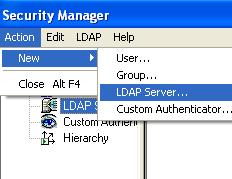
Action -> New -> LDAP Server to add new ldap server


.
b) In new pop up window enter OID server details where
- HostName is machine name on which OID is running
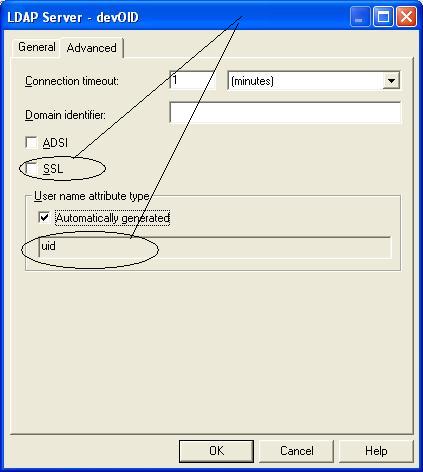
- Port Number is Port on which OID is listening, if you are planning to use SSL port of OID change select SSL in Advanced Tab as shown below
- Base Dn is location in OID tree under which all users sit  (user who wish to login through OBI should be under this tree in OID)
- Bind Dn is distinguished name of supeuser usually orcladmin (super user)
- Bind Password - is password of orcladmin user


Test OID connection by clicking on “Test Connection” button


- If UserName is OID is recognized by cn and NOT uid then change it in advanced name. (OID is using cn or uid as its userName is determined by orclcommonnicknameattribute value in OID)
- If OID is listening on SSL only and you entered SSL port in General Tab then select SSL checkbox in above screen
.
Note - OBI Server should be able to connect to OID server (If there is any firewall between BI Server and OID server open OID port across firewall) .

2. Configure initialization block for user authentication
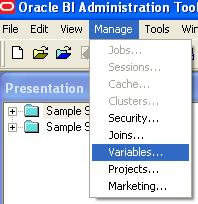
2.1 Administration Tool -> Manage -> Variables ->


.
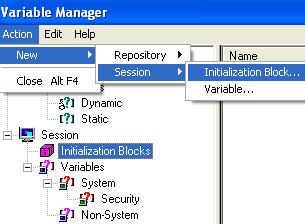
2.2 Action -> New -> Session -> Initialization Block


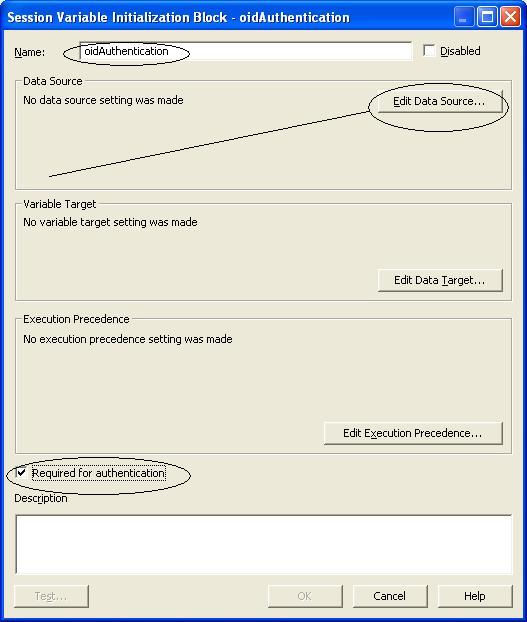
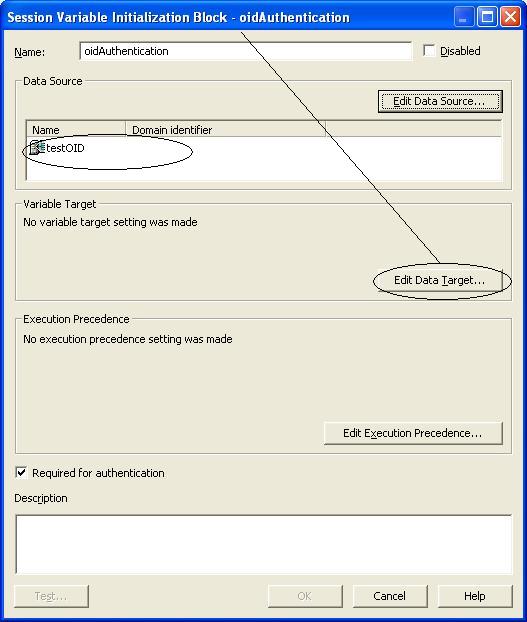
2.3 In Session Variable Initialization Block window, enter Name for session variable and select “Required for Authentication” check box as shown in screenshot


2.4 Now click on “Edit Data Source” button as shows in above screen shot
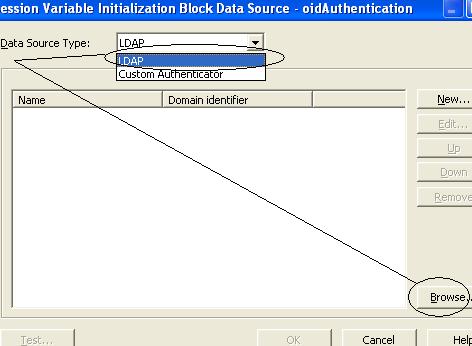
2.5 From drop down list select “LDAP” as datasource and select Browse as shown in below screenshot


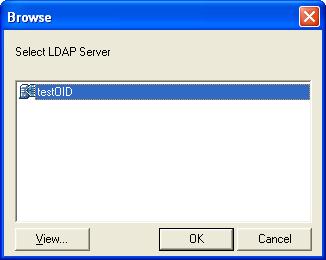
2.6 Select OID server which you created in step1 above and click OK


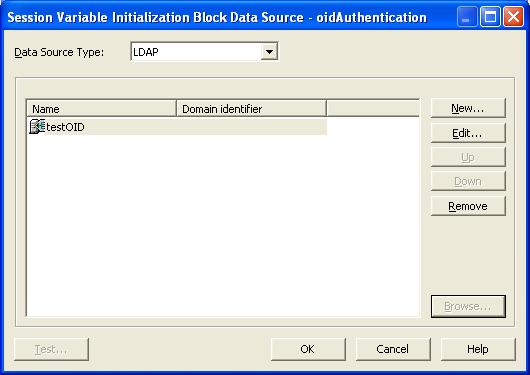
2.7 Click OK on next screen


2.8 Now click on “Edit Data Target” button on Session Variable Initialization Block screen


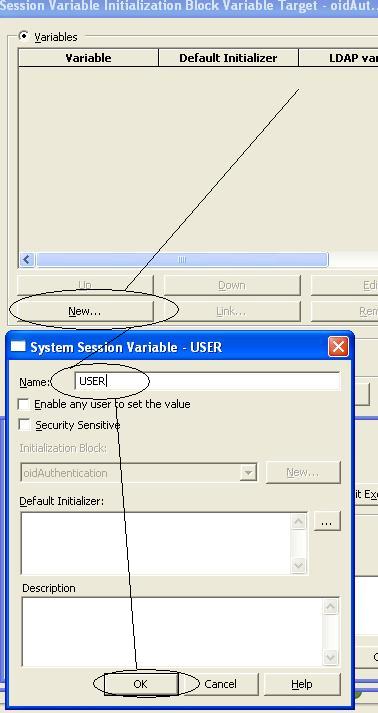
2.9 Click on New and enter Name as USER in “System Session Variable” and click OK as shows in screenshot below


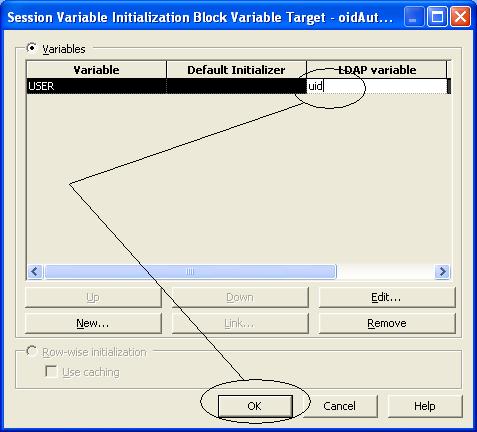
2.10 Enter the value of LDAP variable . This value is usually uid or cn (check value of orclcommonnicknameattribute in OID) and click OK as shown in below screenshot


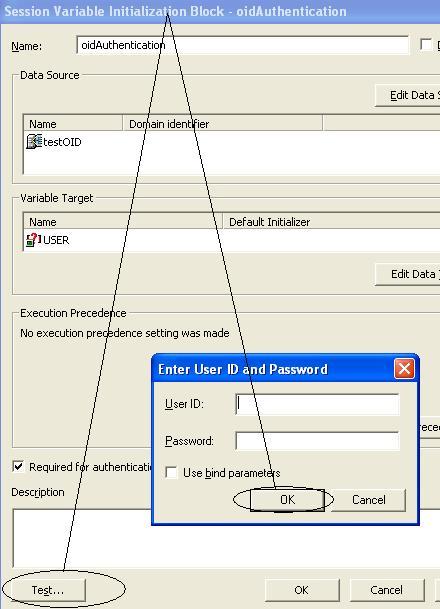
2.11 Finally test your setup by clicking on Test button . Enter any valid Username, Password when prompted


.

Wednesday, 17 July 2013

OBIEE - CONTENTENT

Oracle BI Overview       
·         Describe Oracle’s overall EPM System
·         Define and describe business analytics and business intelligence
·         Describe how OBIEE addresses business intelligence challenges
·         Identify and describe the Oracle Business Inteligence Enterprise Edition (OBIEE) products and components

Oracle BI Applications Overview   
·         Describing the Oracle Business Intelligence Applications
·         Describing the Oracle Business Intelligence logical architecture

Dimensional Modeling      
·         Describe Data Warehousing
·         Describe Dimensions, Facts and Hierarchies

OBI EE Architecture
·         Identify major components of the OBIEE architecture
·         Describe the function of each component

Oracle BI Installation           
·         Explain system requirements, supported platforms and installation pre-requisites
·         Installing OBIEE on windows OS

Oracle BI Repository Overview
 Describe the three layers of the OBI Repository
·                                   Use the Administration Tool to view and modify the repository

Build Basic Repository      
·         Define a System Data Source Name (DSN) for a data source
·         Build the Physical layer of the Repository
·         Build the Logical layer of the Repository
·         Build the presentation layer of the repository

Repository Testing and Deployment
           
·         Describe techniques for testing a repository
·         Execute steps to validate and test a repository

Complex Repository Modeling
           
·         Describe derived metrics and its use
·         Configure derived metrics based on existing logical columns
·         Configure derived metrics based on physical columns

Building a Repository with Multiple Source
 Add multiple sources to an existing logical table source for a dimension in the business model
·                                  Add a second table source to a dimension in the business model

Hierarchies and Level Based Measures           
·         Create a dimensional hierarchy
·         Use level-based measures
·         Describe Aggregate tables and the purpose they serve
·         Create aggregate tables in the OBI repository

Using Variables           
·         Describe session variables
·         Describe repository variables
·         Describe initialization blocks
·         Implement a dynamic repository variable

Oracle BI Security  
·         Define authentication and authorization
·         Describe the different levels at which security is enforced
·         Configure security using Security Manager
·         Configure query governing controls

Cache Management
·         Explain the purpose of cache in OBI
·         Configure caching and manage cache files
·         Develop caching strategies

OBIEE User Interface Overview
·         Describe Oracle BI Answers, Dashboards and Delivers
·         Use Oracle Answers to construct, modify, and save BI requests
·         Use Oracle Answers to construct, modify, and save Filters
·         Use Oracle BI Presentation Catalog to create and modify catalog folders

Working with Oracle BI Answers   
·         Use BI Answers to build analytics requests
·         Add filters to analytics requests
·         Views and Charts in Requests
·         Add additional views of the data returned by the request
·         Create and edit charts
·         Execute direct database requests

Working with Oracle BI Dashboards       
·         Configuring Intelligence Dashboards
·         Create and edit a new dashboard
·         Modify dashboard properties
·         Use Intelligence Dashboard UI objects to create an Intelligence Dashboard
·         Configuring Guided Navigation Links

Working with Oracle Delivers
·         Configure delivery devices
·         Add delivery profiles
·         Build Analytics alerts
·         Create iBots

BI Publisher Overview   
·         Defining Data Set
·         Creating BI Publisher Report
·         Creating Report Template